Digital Signature Generator – Create and Download Your Signature Online Instantly
Signing documents digitally has become an essential part of modern business, education, and personal workflows. Whether you're approving contracts, completing forms, signing PDFs, or adding a signature to emails, having a digital version of your signature can save significant time and effort. Utilixir's Digital Signature Generator makes the process simple by allowing you to create, customize, and download your signature within seconds.
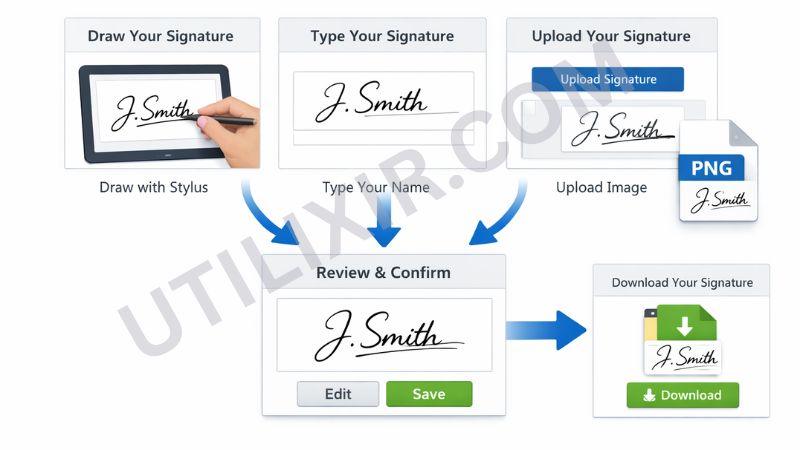
You can draw your signature using a mouse, finger, stylus, or touchscreen, type your name in a handwritten font, or upload an existing scanned signature image. Once created, your signature can be downloaded as a high-quality PNG file and used wherever you need it. Best of all, the tool works entirely in your browser without registration, software installation, or privacy concerns.
✍️ Digital Signature Generator
Draw, type, or upload your signature and download it as an image for documents, emails, and more.
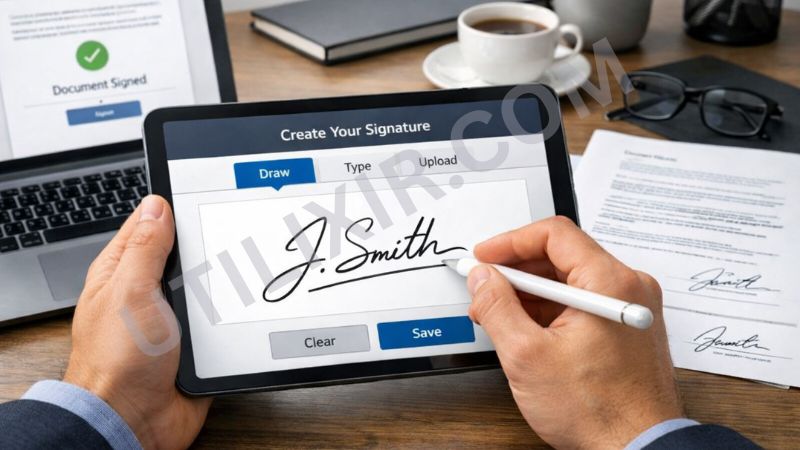
Traditional document signing often requires printing, signing by hand, scanning, and sending documents back—a process that can be slow and inconvenient. A Digital Signature Generator eliminates these steps by providing an instant way to create reusable signatures that can be inserted into forms, documents, contracts, invoices, and email signatures. This not only saves time but also improves productivity and convenience for both personal and professional use.
Utilixir's Digital Signature Generator fits naturally into a digital workflow alongside other useful tools. After creating your signature, you can use the Image to PDF tool to include signed images within PDF documents, the HTML to PDF Converter for generating finalized digital reports, or the Image Resizer to adjust your signature dimensions for specific forms and document layouts. Together, these tools help simplify document preparation and digital communication.
Key Features
Multiple Signature Creation Methods
Draw, type, or upload your signature based on your preferred method.
Instant Signature Generation
Create and download your signature within seconds.
Download as PNG
Save your signature as a high-quality transparent PNG image.
Draw with Mouse, Finger, or Stylus
Supports multiple input methods for greater flexibility.
Handwritten Font Option
Type your name and generate a signature-style version instantly.
Upload Existing Signature
Use a scanned signature image if you already have one available.
No Registration Required
Access the tool immediately without creating an account.
Secure and Private
Your signature is never stored, shared, or uploaded to external servers.
Cross-Platform Compatibility
Works on desktops, laptops, tablets, and smartphones.
How to Use the Tool
Open the Digital Signature Generator.
Choose a signature creation mode:
Draw
Type
Upload
Create your signature using your preferred method.
Preview the generated signature.
Make adjustments if needed.
Click "Download PNG."
Save the signature image to your device.
Insert the signature into documents, forms, contracts, or emails.
Why Choose Utilixir's Digital Signature Generator Over Other Tools?
Many signature tools require account registration, paid subscriptions, or limit access to essential features. Utilixir's Digital Signature Generator focuses on simplicity, privacy, and accessibility by allowing users to create and download signatures instantly without hidden costs or unnecessary complexity.

Comparison Table
User Testimonials
Michael Turner – United States
"I needed a signature for several forms and contracts. This tool made the process incredibly simple."
Olivia Hughes – United Kingdom
"The typed signature option looks professional and saved me from printing and scanning documents."
Lucas Bernard – France
"I uploaded my existing signature and downloaded a clean PNG in seconds. Very convenient."
Hannah Schmidt – Germany
"The drawing feature works perfectly on my tablet. It's now my preferred way to create digital signatures."
Conclusion
Utilixir's Digital Signature Generator offers a quick and reliable way to create professional digital signatures for documents, forms, contracts, and emails. With support for drawing, typing, and uploading signatures, along with secure browser-based processing and instant PNG downloads, it provides a practical solution for both personal and professional users. When combined with tools such as Image to PDF, HTML to PDF, and Image Resizer, it becomes part of a complete document management workflow that simplifies digital signing and file preparation.
Frequently Asked Questions
1. What is a Digital Signature Generator?
A Digital Signature Generator allows you to create a digital version of your signature that can be used in documents, forms, emails, and contracts.
2. Is the tool free to use?
Yes. Utilixir's Digital Signature Generator is completely free.
3. Can I draw my signature?
Yes. You can draw your signature using a mouse, finger, stylus, or touchscreen device.
4. Can I type my signature instead?
Yes. The tool includes a handwritten-style font option for typed signatures.
5. Can I upload an existing signature image?
Yes. You can upload a scanned signature and use it directly.
6. What format will my signature be downloaded in?
Your signature is downloaded as a PNG image.
7. Do I need to create an account?
No. The tool can be used instantly without registration.
8. Is my signature stored online?
No. Your signature is never stored or shared.
9. Can I use the tool on mobile devices?
Yes. It works on smartphones, tablets, laptops, and desktop computers.
10. Can I use my generated signature for official documents?
In many cases, yes. However, acceptance depends on the requirements of the organization, institution, or service receiving the document.
Create Your Digital Signature Instantly
Try Utilixir’s Digital Signature Generator now and sign documents online in seconds.
Start Signing