JSON Formatter & Validator – Clean, Beautify & Validate JSON Instantly
JSON (JavaScript Object Notation) is one of the most widely used data formats in modern web development, powering APIs, applications, configuration files, and backend systems. However, raw or minified JSON is often difficult to read, debug, or analyze. Utilixir’s JSON Formatter & Validator solves this by instantly transforming unstructured data into a clean, readable, and well-organized format.
With just a single paste or file upload, you can beautify JSON, validate its structure, and quickly identify errors such as missing brackets, incorrect syntax, or malformed data. Whether you're a developer working with APIs, a student learning data structures, or a professional handling large datasets, this tool ensures your JSON is always clean and reliable.
🧾 JSON Formatter & Validator
Paste your JSON to format, validate and preview.

Working with unformatted or invalid JSON can lead to debugging issues, broken API responses, and inefficient development workflows. Without proper structure, even small errors like missing commas or brackets can disrupt entire applications. A JSON Formatter helps eliminate these issues by organizing data into a structured, readable format while also validating its correctness.
Utilixir’s JSON Formatter integrates smoothly into everyday development workflows. After formatting JSON, you can use the Word Counter to analyze response size, the HTML Formatter when converting JSON-driven templates, or the Online Text Editor to document and refine API responses. Together, these tools support developers in managing structured data more effectively and improving overall productivity.
Key Features
Instant JSON Beautification
Automatically formats raw or minified JSON into a clean, structured layout.
Built-in Validation
Detects syntax errors, missing brackets, and malformed structures instantly.
Error Highlighting
Clearly identifies the exact location of issues within your JSON data.
Large File Support
Handles moderately large JSON files efficiently for everyday development use.
Browser-Based Processing
Works directly in your browser with no installation required.
No Registration Required
Use the tool instantly without signing up or logging in.
Secure and Private
All processing happens locally; no data is stored or shared.
Cross-Device Compatibility
Works seamlessly across desktops, laptops, tablets, and smartphones.
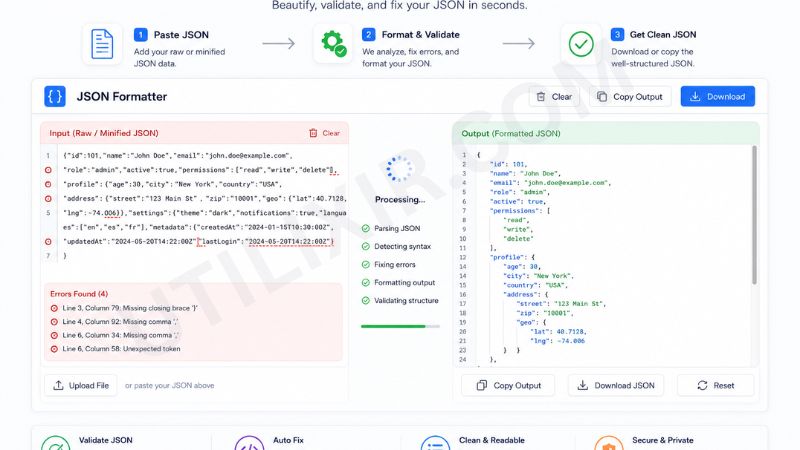
How to Use the JSON Formatter
Paste your JSON data or upload a .json file.
Click the "Format JSON" button.
The tool will automatically beautify and validate your data.
Review highlighted errors if any exist.
Fix issues directly in the editor if needed.
Copy the formatted JSON or download it as a file.
Use the cleaned JSON in APIs, applications, or documentation.
Why Choose Utilixir's JSON Formatter Over Other Tools?
Many JSON tools either lack proper validation, require account registration, or rely on external servers that raise privacy concerns. Utilixir’s JSON Formatter & Validator offers a fast, secure, and fully browser-based solution that ensures both accuracy and privacy without unnecessary complexity.

Comparison Table
User Testimonials
Daniel Wright – United States
"This tool makes debugging API responses so much easier. The error highlighting is extremely helpful."
Sophie Laurent – France
"I use it daily for cleaning JSON from backend systems. Very fast and reliable."
Miguel Torres – Spain
"Perfect for students learning APIs. It makes JSON structure easy to understand."
Ayesha Khan – Pakistan
"Simple, secure, and efficient. Exactly what I needed for handling project data."
Conclusion
Utilixir’s JSON Formatter & Validator provides a fast and reliable way to clean, structure, and validate JSON data. With instant formatting, built-in error detection, secure browser-based processing, and support for development workflows, it is an essential tool for anyone working with APIs, applications, or structured data. When combined with tools like the HTML Formatter, Online Text Editor, and Word Counter, it becomes part of a complete productivity toolkit designed to simplify modern development tasks.
Frequently Asked Questions
1. What is a JSON Formatter?
A JSON Formatter is a tool that organizes JSON data into a readable and structured format.
2. Is the JSON Formatter free to use?
Yes. Utilixir’s JSON Formatter is completely free.
3. Does it validate JSON data?
Yes. It checks for syntax errors and malformed structures.
4. Can it fix broken JSON?
It highlights errors, but some fixes may require manual correction.
5. Is my JSON data stored online?
No. All processing happens in your browser.
6. Can I upload JSON files?
Yes. You can paste or upload .json files.
7. Does it support large JSON files?
Yes, but performance is best with moderately sized datasets.
8. Can I use it on mobile devices?
Yes. It works on all modern devices and browsers.
9. What happens if my JSON is invalid?
The tool highlights the exact location of errors for easy debugging.
10. Who should use this tool?
Developers, students, data analysts, and anyone working with APIs or structured data can benefit from this tool.
🧾 JSON Formatter & Validator
Paste your JSON to format, validate and preview.
Format JSON