JavaScript Formatter & Beautifier – Clean and Structure Your JS Code Instantly
JavaScript is one of the most widely used programming languages for building interactive websites, web applications, and backend services. However, JavaScript code can often become messy, minified, or difficult to read—especially when working with legacy projects or third-party scripts. Utilixir’s JavaScript Formatter & Beautifier helps solve this by instantly transforming cluttered code into clean, structured, and readable JavaScript.
With just a single paste or file upload, your code is automatically indented, organized, and optimized for readability. Whether you're debugging an application, learning JavaScript, or reviewing someone else’s code, this tool helps you understand logic faster and write cleaner programs with ease.
🛠️ JavaScript Formatter & Validator
Paste your JavaScript to format, validate and preview (no execution).

Unformatted JavaScript can be difficult to debug, maintain, and scale. Minified scripts or poorly structured code often hide logical errors and make collaboration harder within development teams. A JavaScript Formatter solves this by converting messy code into a structured format with proper indentation, spacing, and alignment, making it significantly easier to read and work with.
Utilixir’s JavaScript Formatter fits naturally into modern development workflows. After formatting your script, you can use the HTML Formatter to structure web pages that use your JavaScript, the CSS Formatter to align styling logic, or the JSON Formatter to clean API responses used in your applications. Together, these tools create a complete ecosystem for efficient front-end and back-end development.
Key Features
Instant Code Beautification
Automatically formats messy or minified JavaScript into clean, readable code.
Smart Indentation
Applies consistent indentation and structure to improve readability.
File Upload Support
Paste code directly or upload .js files for instant formatting.
Syntax Highlight Awareness
Helps detect potential structure and syntax issues during formatting.
Browser-Based Tool
Runs directly in your browser without installation.
No Registration Required
Start formatting immediately without creating an account.
Secure and Private Processing
Your code is never stored, saved, or shared externally.
Cross-Device Compatibility
Works smoothly on desktops, laptops, tablets, and smartphones.
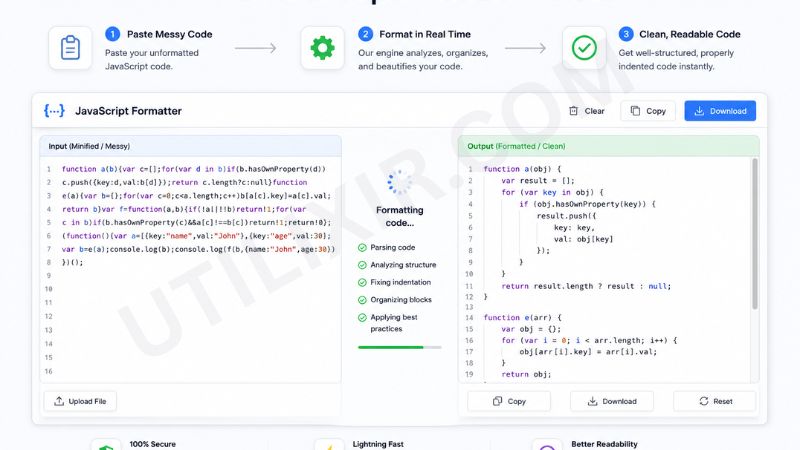
How to Use the JavaScript Formatter
Paste your JavaScript code or upload a .js file.
Click the "Format JS" button.
Wait for the tool to automatically beautify your code.
Review the structured and indented output.
Fix any visible syntax issues if needed.
Copy or download the formatted JavaScript file.
Use it for development, debugging, or documentation.
Why Choose Utilixir's JavaScript Formatter Over Other Tools?
Many JavaScript formatting tools require installation, external configuration, or account registration. Some also lack real-time privacy protection. Utilixir’s JavaScript Formatter offers a fast, secure, and fully browser-based solution that delivers accurate formatting without compromising simplicity or user privacy.

Comparison Table
Utilixir’s JavaScript Formatter provides a lightweight, privacy-focused, and highly efficient solution for developers who need clean, structured code instantly without setup or complexity.
User Testimonials
James Walker – United States
"This tool makes debugging so much easier. My JavaScript is finally readable again."
Isabella Rossi – Italy
"I use it for cleaning minified scripts before editing. Very fast and accurate."
Oliver Smith – United Kingdom
"Perfect for reviewing team code. It saves a lot of time during collaboration."
Ayesha Khan – Pakistan
"Simple, secure, and extremely useful for my web development projects."
Conclusion
Utilixir’s JavaScript Formatter & Beautifier is a fast and reliable tool for cleaning, structuring, and improving JavaScript code. With instant formatting, smart indentation, secure browser-based processing, and cross-device support, it helps developers write and maintain better code effortlessly. When combined with tools like the HTML Formatter, CSS Formatter, and JSON Formatter, it becomes part of a complete development toolkit designed to improve productivity, readability, and workflow efficiency.
Frequently Asked Questions
1. What is a JavaScript Formatter?
A JavaScript Formatter is a tool that organizes and beautifies JavaScript code for better readability.
2. Is this tool free to use?
Yes. Utilixir’s JavaScript Formatter is completely free.
3. Can it format minified JavaScript?
Yes. It expands and structures minified code into readable format.
4. Do I need to install any software?
No. The tool works entirely in your browser.
5. Is my JavaScript stored online?
No. Your code is never stored or shared.
6. Can I upload JS files?
Yes. You can paste code or upload .js files directly.
7. Does it detect errors?
It helps highlight potential syntax and structural issues.
8. Can I use it on mobile devices?
Yes. It works on all modern devices and browsers.
9. Will formatting change how my code works?
No. It only changes structure and readability, not logic.
10. Who should use this tool?
Developers, students, and anyone working with JavaScript can benefit from this formatter.
🛠️ JavaScript Formatter & Validator
Paste your JavaScript to format, validate and preview (no execution).
Format JS